Bluekit phishing kit adopts browser-in-the-middle for login theft

The Bluekit phishing-as-a-service platform continues to evolve with nearly 70 new hostnames identified over the past week, and by adding browser-in-the-middle (BitM) capabilities for improved data theft.
First documented in April by Varonis researchers, Bluekit provides an AI assistant that supports multiple large language models (Llama, GPT-4.1, Claude, Gemini, and DeepSeek) for drafting phishing emails.
At the time, the phishing kit offered “customers” 40 distinct templates targeting popular online services such as Outlook, Hotmail, Gmail, Yahoo, ProtonMail, iCloud, GitHub, and Ledger.
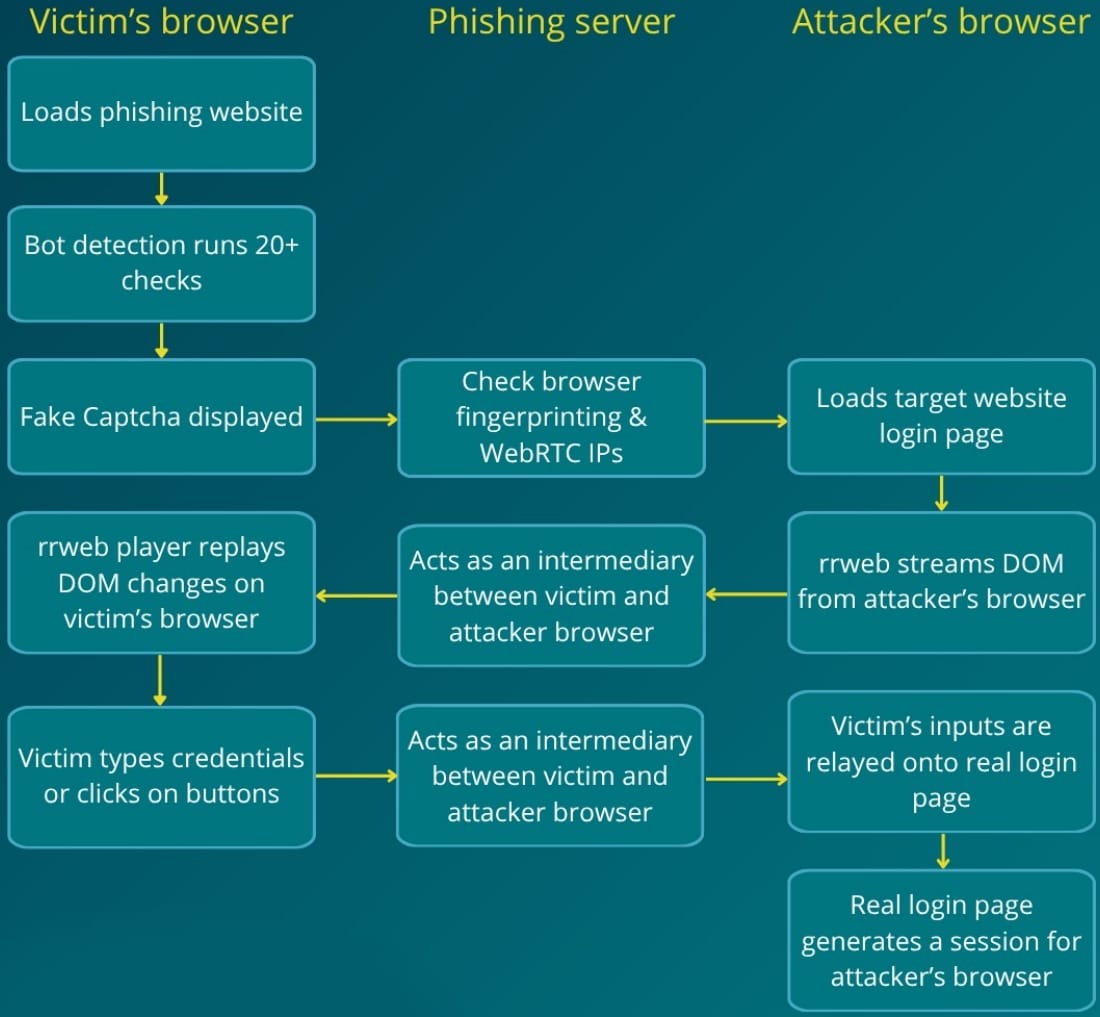
A new report from digital risk protection company Netcraft warns that Bluekit has switched from adversary-in-the-middle to a BitM mechanism that uses the open-source JavaScript library ‘rrweb’ to serialize the page’s DOM and stream it over a WebSocket connection to the victim.
In a BitM attack, the victim interacts with a browser session controlled by the attacker, which loads the legitimate login page and relays requests and responses between the victim and the target service.
Netcraft notes that rrweb itself is a legitimate project widely used for session replay and analytics, and its presence in a web environment should not be interpreted as an indicator of compromise without a larger context.
Images, fonts, and CSS are fetched through the phishing infrastructure, while the victim’s inputs are forwarded back to the attacker’s browser.
The researchers state that rrweb was chosen for its excellent visual fidelity, real-time interactivity, and bandwidth efficiency.
However, some latency still exists, so any keyboard input and mouse click delays on the login pages should be considered as red flags.
Authentication completes in the attacker's browser, granting them a valid session token and unlimited access to the victim’s account.
The BitM attack method has been known since 2022, devised by researcher mr.d0x and later adopted for malicious activity.
Before stealing the credentials, Bluekit uses a comprehensive victim qualification system to distinguish real targets from researchers or security crawlers.
Anti-analysis systems in the latest Bluekit include:
- Randomized CSS filters to defeat screenshot-based detection.
- A large (>1 MB), frequently changing obfuscated JavaScript bundle.
- Custom CAPTCHA that may imitate Cloudflare or the target brand.
- Browser fingerprinting (RAM, CPU cores, screen resolution, language, headless browser detection, anti-fingerprinting extensions).
- WebRTC-based IP mismatch detection to identify users behind proxies or VPNs.
Netcraft also reports that the live (5-second update interval) monitoring system Varonis previously documented is still available in BlueKit, allowing operators to monitor victims as they are entrapped in deceptive login sessions and track their actions after login.
The researchers's report provides a set of indicators and signals that are associated with Bluekit but do not constitute indicators of compromise.
These include CSS filter manipulation on top-level HTML elements with randomized values, an obfuscated JavaScript bundle that is rotated periodically, browser fingerprint checks, a WebSocket connection sending encrypted or binary data on login pages, and WebRTC IP mismatch detection on the landing page.
For organizations looking to defend against increasingly sophisticated phishing, business email compromise (BEC), and account takeover (ATO) attacks, BleepingComputer is hosting a webinar with Abnormal titled "Stop chasing alerts: Automating email security with behavioral AI."
The webinar will explore how behavioral AI can help security teams detect and respond to modern phishing attacks, automate investigations and remediation, and reduce the operational burden caused by alert fatigue and increasingly sophisticated social engineering campaigns.
Test every layer before attackers do
Security teams log 54% of successful attacks and alert on just 14%. The rest move through your environment unseen.
The Picus whitepaper shows how breach and attack simulation tests your SIEM and EDR rules so threats stop slipping by detection.
Get the whitepapersource: BleepingComputer