ScyScan - Free Online Security & Network Tools

ScyScan provides a suite of free security tools — try our web scanner, virus scanner, link checker, SSL checker, WHOIS lookup, and IP lookup all in one place.

Explore All Tools

Cybersecurity Toolkit

Choose from our range of free online security and network tools to protect your devices, websites, and online presence

Web Scanner

Check websites for vulnerabilities and other security issues, providing real-time results and detailed analysis.

Scan Website / URL

Virus Scanner

Scan files for malware, viruses, trojans, and other threats using multi-engine technology.

Scan Files

Link Checker

Verify URLs for safety, detect phishing attempts, and check if links lead to malicious websites.

Check Links

SSL Checker

Analyze SSL certificates, check expiration dates, and verify proper encryption implementation.

Check SSL

Whois

Get detailed domain registration information including owner details, registration dates, and expiration.

Lookup Domain

IP Lookup

Identify geographic location, ISP information, and other details about any IP address.

Lookup IP

Why Choose ScyScan

ScyScan brings together essential security and network tools in a single, free platform designed for everyday use

🔒

All-in-One Platform

Web scanner, link checker, virus scanner, SSL checker, WHOIS, and IP lookup — all available from one place.

🔄

Trusted Reliability

Built on up-to-date threat intelligence and network databases you can count on.

🚀

Results in Seconds

Most checks complete within seconds so you get answers fast.

💰

Completely Free

All our security and network tools are free to use with no hidden costs or fair use restrictions.

🌐

Online Access

No software installation required - access our tools from any browser, anywhere.

📊

Clear Reports

Receive straightforward analysis and easy-to-understand reports for every tool.

Built for Everyday Security

ScyScan combines multiple security data sources and network databases into one accessible platform. No complex setup — just enter what you need and get clear results.

Multiple Data Sources

Aggregated threat intelligence from trusted security feeds for comprehensive coverage

Network Databases

Access to extensive WHOIS and IP geolocation databases for accurate information

Privacy Focused

We respect your privacy and automatically delete scans and lookups after analysis

Continuously Updated

Data sources are refreshed regularly so you get current information.

How People Use ScyScan Tools

📧 Check Attachments

Use our virus scanner to check files before opening them

🌐 Audit Your Website

Run a web scan to check your website for known vulnerabilities

🔗 Verify Links

Use the link checker to test if a URL is safe before clicking

🔐 Inspect SSL

Check SSL certificate validity and configuration for any domain

🏢 Research Domains

Look up domain registration details with the WHOIS tool

📍 Trace IPs

Find geographic and network details for any IP address

Start Using ScyScan Tools

All tools are free and ready to use — no account or sign-up required

Explore All Tools

TikTok for Business accounts targeted in new phishing campaign

TikTok for Business accounts targeted in new phishing campaign

Threat actors are targeting TikTok for Business accounts in a phishing campaign that prevents security bots from analyzing malicious pages.

TikTok Business accounts may be targeted due to their high potential for abuse in malvertising campaigns, ad fraud, and the distribution of malicious content.

Browser threat detection and response company Push Security links the campaign to one documented last year, which targeted Google Ad Manager accounts.

TikTok has previously been used to spread information-stealing malware via malicious videos, as well as cryptocurrency scams via fake promotions. TikTok for Business accounts are ideal for such purposes due to their increased reach and perceived legitimacy.

In a report shared with BleepingComputer, Push Security says that victims are lured to Cloudflare-hosted phishing pages registered on March 24 via NiceNIC, a registrar often reported by cybersecurity researcher for being used for cybercriminal activities.

Push Security could not determine the initial delivery mechanism, but believes that the threat actor uses a similar method as observed in activity reported by Sublime Security.

The initial link redirects via a legitimate Google Storage URL, blocks bots using a Cloudflare Turnstile check, and then redirects to the malicious pages.

The domains feature similar names, and are all hosted on the same Google Storage bucket:

  • welcome.careerscrews[.]com
  • welcome.careerstaffer[.]com
  • welcome.careersworkflow[.]com
  • welcome.careerstransform[.]com
  • welcome.careersupskill[.]com
  • welcome.careerssuccess[.]com
  • welcome.careersstaffgrid[.]com
  • welcome.careersprogress[.]com
  • welcome.careersgrower[.]com
  • welcome.careersengage[.]com
  • welcome.careerscrews[.]com

The malicious pages impersonate TikTok for Business and Google Careers “Schedule a Call” pages, requesting visitors to enter basic information in a form to validate they’re using a business email address.
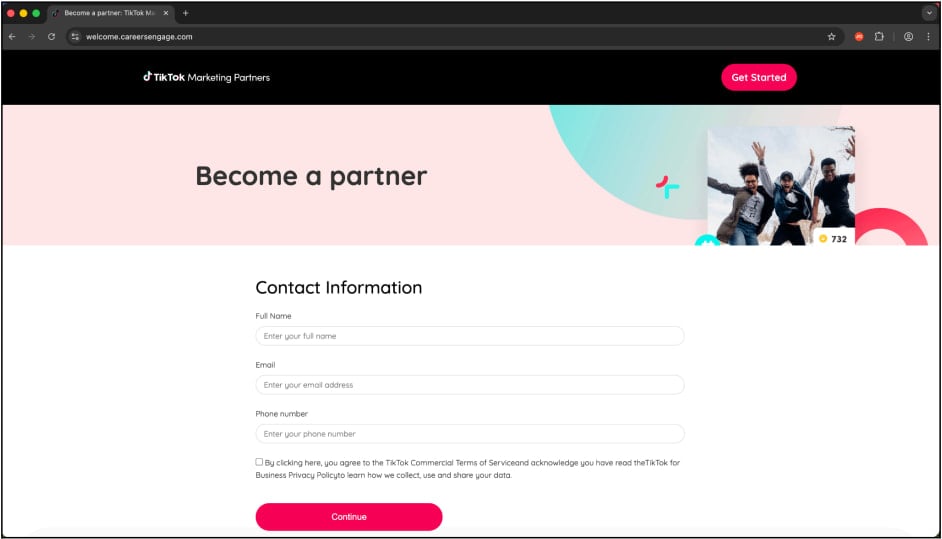
Collecting basic information in a first validation step
Collecting basic information in a first validation stepSource: Push Security

After this step, victims are served a fake login page, which is a reverse proxy designed to capture credentials and session cookies, and to exfiltrate them to the attacker.

Since the page acts as an intermediary between the legitimate user and the service, the threat actor can hijack accounts even when the two-factor authentication (2FA) protection is active.
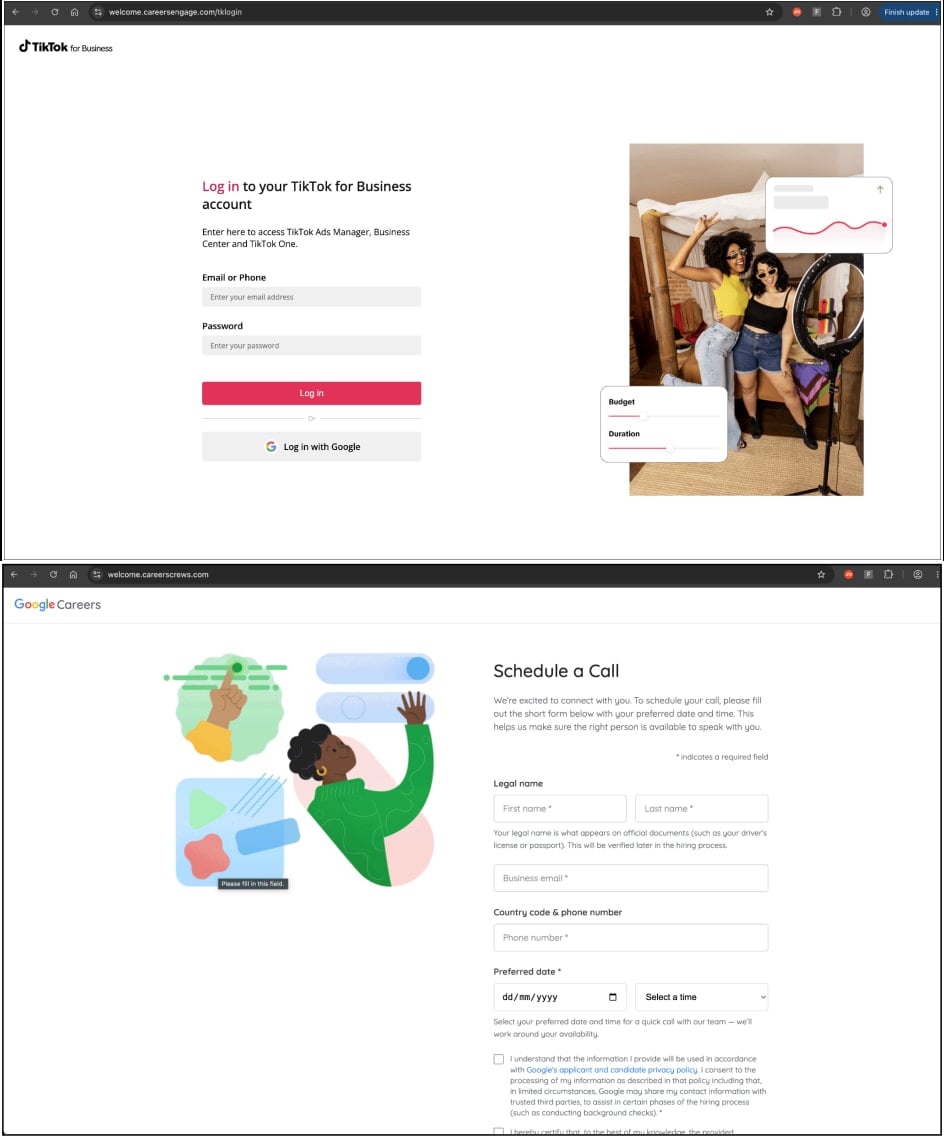
The TikTok themed (top) and Google (bottom) phishing pages
The TikTok themed (top) and Google (bottom) phishing pagesSource: Push Security

Push Security also notes that business account holders often log into TikTok via Google single sign-on (SSO) service. "This means that anyone using Google to login to their TikTok account will effectively have both accounts used to distribute ads compromised in one go."

Users should be extremely cautious with suspicious invites and job offers, and never trust links sent from unknown contacts. Always check the domain before entering credentials, and use passkeys to protect valuable accounts.

Top News: