ScyScan - Free Online Security & Network Tools

ScyScan provides a suite of free security tools β€” try our web scanner, virus scanner, link checker, SSL checker, WHOIS lookup, and IP lookup all in one place.

Explore All Tools

Cybersecurity Toolkit

Choose from our range of free online security and network tools to protect your devices, websites, and online presence

Web Scanner

Check websites for vulnerabilities and other security issues, providing real-time results and detailed analysis.

Scan Website / URL

Virus Scanner

Scan files for malware, viruses, trojans, and other threats using multi-engine technology.

Scan Files

Link Checker

Verify URLs for safety, detect phishing attempts, and check if links lead to malicious websites.

Check Links

SSL Checker

Analyze SSL certificates, check expiration dates, and verify proper encryption implementation.

Check SSL

Whois

Get detailed domain registration information including owner details, registration dates, and expiration.

Lookup Domain

IP Lookup

Identify geographic location, ISP information, and other details about any IP address.

Lookup IP

Why Choose ScyScan

ScyScan brings together essential security and network tools in a single, free platform designed for everyday use

πŸ”’

All-in-One Platform

Web scanner, link checker, virus scanner, SSL checker, WHOIS, and IP lookup β€” all available from one place.

πŸ”„

Trusted Reliability

Built on up-to-date threat intelligence and network databases you can count on.

πŸš€

Results in Seconds

Most checks complete within seconds so you get answers fast.

πŸ’°

Completely Free

All our security and network tools are free to use with no hidden costs or fair use restrictions.

🌐

Online Access

No software installation required - access our tools from any browser, anywhere.

πŸ“Š

Clear Reports

Receive straightforward analysis and easy-to-understand reports for every tool.

Built for Everyday Security

ScyScan combines multiple security data sources and network databases into one accessible platform. No complex setup β€” just enter what you need and get clear results.

Multiple Data Sources

Aggregated threat intelligence from trusted security feeds for comprehensive coverage

Network Databases

Access to extensive WHOIS and IP geolocation databases for accurate information

Privacy Focused

We respect your privacy and automatically delete scans and lookups after analysis

Continuously Updated

Data sources are refreshed regularly so you get current information.

How People Use ScyScan Tools

πŸ“§ Check Attachments

Use our virus scanner to check files before opening them

🌐 Audit Your Website

Run a web scan to check your website for known vulnerabilities

πŸ”— Verify Links

Use the link checker to test if a URL is safe before clicking

πŸ” Inspect SSL

Check SSL certificate validity and configuration for any domain

🏒 Research Domains

Look up domain registration details with the WHOIS tool

πŸ“ Trace IPs

Find geographic and network details for any IP address

Start Using ScyScan Tools

All tools are free and ready to use β€” no account or sign-up required

Explore All Tools

Order-tracking app Shop abused to push callback phishing attacks

Order-tracking app Shop abused to push callback phishing attacks

Threat actors are increasingly abusing Shop, the order-tracking app from Shopify, by adding fake purchase receipts in users' order histories to trick them into providing sensitive data or installing remote access software.

The Shop digital shopping assistant serves as a centralized platform where users can track orders from multiple online retailers, access receipts and shipping updates, and discover and purchase products from merchants that use Shopify.

The app is very popular in North America, where support and purchasing options are more substantial. It has 50 million downloads on Google Play and 7 million ratings in Apple's App Store.

image

According to cybersecurity company Gen Digital, scammers are inserting fake orders that appear alongside legitimate purchases, impersonating brands such as Norton, McAfee, Apple, and PayPal.
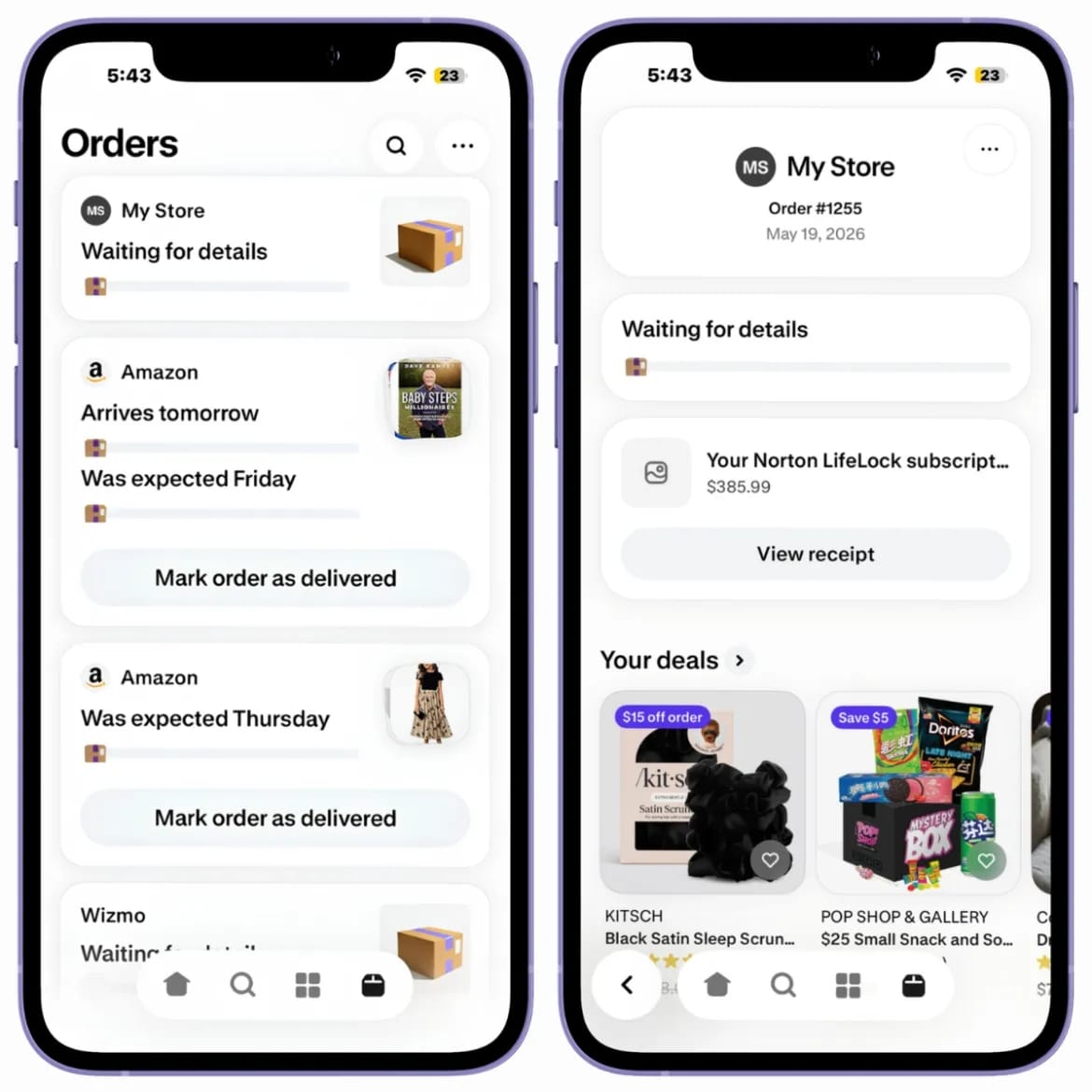
Fake Norton purchase receipt in the Shop app
Fake Norton purchase receipt in the Shop appSource: Gen Digital

The threat actor also listed a phone number in the digital receipts that users can call to dispute purchases. However, at the other end is a scammer posing as a support agent.

Using social engineering tactics, the fraudster tries to convince the victim to disclose account credentials, payment card details, and temporary authentication codes (OTPs).

In some cases, the researchers say that victims are tricked into installing software that grants remote access to the device.

Gen Digital researchers note that inserting the fake receipts in the Shop app is a more effective method than using email to deliver fraudulent purchase notifications, a more common technique known as callback phishing.

Shop is a legitimate shopping app, and users inherently trust it, so orders that appear there are far more likely to prompt responses from unsuspecting users.

However, the researchers say that many of the false receipts contain poor grammar, which is an obvious red flag. Nevertheless, users may miss the mistakes when they see an invoice for a large purchase.

Despite the observed wave of fraudulent invoices, it is unclear how they are inserted into the Shop app.

The researchers say that Shop can populate orders from multiple sources, including email parsing, account association, and order workflows, but no particular one could be confirmed as the delivery channel for the fraudulent notifications.

Gen Digital underlines that they found no evidence that Shop, Shopify, or any of the impersonated companies were compromised.

BleepingComputer has reached out to Shopify with related questions, but we have not received a response as of publishing.

Until the situation clears up, users who see receipts for orders they didn’t place on Shop are advised not to call the phone number listed on them, but instead to verify any alleged charge directly with their bank.

Those who have already contacted the scammers and disclosed sensitive information should immediately reset their account passwords and contact their card issuer for cancellation.

Test every layer before attackers do

Security teams log 54% of successful attacks and alert on just 14%. The rest move through your environment unseen.

The Picus whitepaper shows how breach and attack simulation tests your SIEM and EDR rules so threats stop slipping by detection.

Get the whitepaper

Top News: