Open VSX Bug Let Malicious VS Code Extensions Bypass Pre-Publish Security Checks

Cybersecurity researchers have disclosed details of a now-patched bug impacting Open VSX's pre-publish scanning pipeline to cause the tool to allow a malicious Microsoft Visual Studio Code (VS Code) extension to pass the vetting process and go live in the registry.
"The pipeline had a single boolean return value that meant both 'no scanners are configured' and 'all scanners failed to run,'" Koi Security researcher Oran Simhony said in a report shared with The Hacker News. "The caller couldn't tell the difference. So when scanners failed under load, Open VSX treated it as 'nothing to scan for' and waved the extension right through."
Early last month, the Eclipse Foundation, which maintains Open VSX, announced plans to enforce pre-publish security checks before VS Code extensions are published to the repository in an attempt to tackle the growing problem of malicious extensions.
With Open VSX also serving as the extension marketplace for Cursor, Windsurf, and other VS Code forks, the move was seen as a proactive approach to prevent rogue extensions from getting published in the first place. As part of pre-publish scanning, extensions that fail the process are quarantined for admin review.
The vulnerability discovered by Koi, codenamed Open Sesame, has to do with how this Java-based service reports the scan results. Specifically, it's rooted in the fact that it misinterprets scanner job failures as no scanners are configured, causing an extension to be marked as passes, and then immediately activated and made available for download from Open VSX.
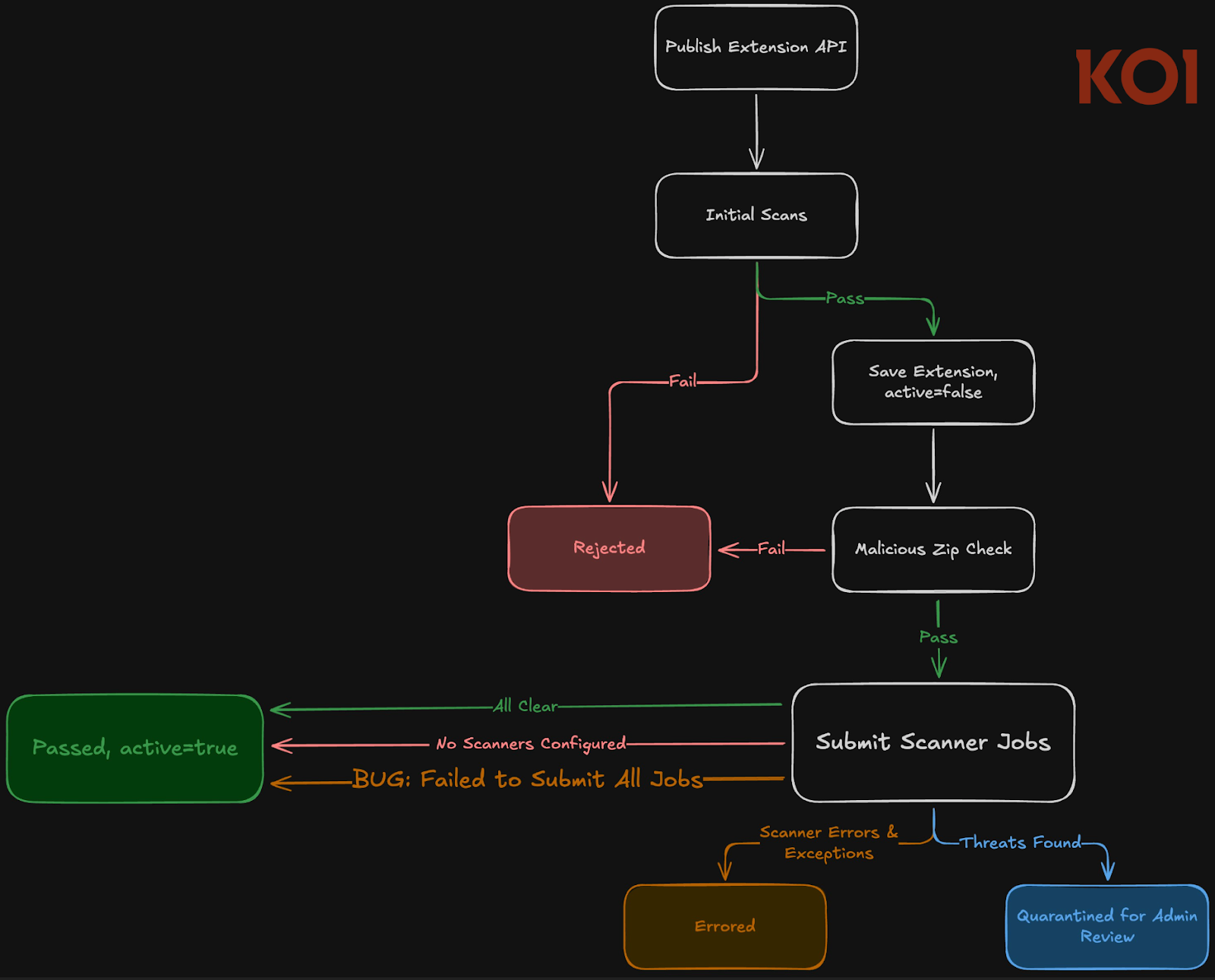
At the same time, it can also refer to a scenario where the scanners exist, and the scanner jobs have failed and cannot be enqueued because the database connection pool is exhausted. Even more troublingly, a recovery service designed to retry failed scans suffered from the same problem, thereby allowing extensions to skip the entire scanning process under certain conditions.
An attacker can take advantage of this weakness to flood the publish endpoint with several malicious .VSIX extensions, causing the concurrent load to exhaust the database connection pool. This, in turn, leads to a scenario where scan jobs fail to enqueue.
What's notable about the attack is that it does not require any special privileges. A malicious actor with a free publisher account could have reliably triggered this vulnerability to undermine the scanning process and get their extension published. The issue was addressed in Open VSX version 0.32.0 last month following responsible disclosure on February 8, 2026.
"Pre-publish scanning is an important layer, but it's one layer," Koi said. "The pipeline's design is sound, but a single boolean that couldn't distinguish between 'nothing to do' and 'something went wrong' turned the entire infrastructure into a gate that opened under pressure."
"This is a common anti-pattern: fail-open error handling hiding behind a code path designed for a legitimate 'nothing to do' case. If you're building similar pipelines, make failure states explicit. Never let 'no work needed' and 'work failed' share a return value."
source: TheHackerNews