
ScyScan - Free Online Security & Network Tools

ScyScan provides a suite of free security tools — try our web scanner, virus scanner, link checker, SSL checker, WHOIS lookup, and IP lookup all in one place.

Explore All Tools

Cybersecurity Toolkit

Choose from our range of free online security and network tools to protect your devices, websites, and online presence

Web Scanner

Check websites for vulnerabilities and other security issues, providing real-time results and detailed analysis.

Scan Website / URL

Virus Scanner

Scan files for malware, viruses, trojans, and other threats using multi-engine technology.

Scan Files

Link Checker

Verify URLs for safety, detect phishing attempts, and check if links lead to malicious websites.

Check Links

SSL Checker

Analyze SSL certificates, check expiration dates, and verify proper encryption implementation.

Check SSL

Whois

Get detailed domain registration information including owner details, registration dates, and expiration.

Lookup Domain

IP Lookup

Identify geographic location, ISP information, and other details about any IP address.

Lookup IP

Why Choose ScyScan

ScyScan brings together essential security and network tools in a single, free platform designed for everyday use

🔒

All-in-One Platform

Web scanner, link checker, virus scanner, SSL checker, WHOIS, and IP lookup — all available from one place.

🔄

Trusted Reliability

Built on up-to-date threat intelligence and network databases you can count on.

🚀

Results in Seconds

Most checks complete within seconds so you get answers fast.

💰

Completely Free

All our security and network tools are free to use with no hidden costs or fair use restrictions.

🌐

Online Access

No software installation required - access our tools from any browser, anywhere.

📊

Clear Reports

Receive straightforward analysis and easy-to-understand reports for every tool.

Built for Everyday Security

ScyScan combines multiple security data sources and network databases into one accessible platform. No complex setup — just enter what you need and get clear results.

Multiple Data Sources

Aggregated threat intelligence from trusted security feeds for comprehensive coverage

Network Databases

Access to extensive WHOIS and IP geolocation databases for accurate information

Privacy Focused

We respect your privacy and automatically delete scans and lookups after analysis

Continuously Updated

Data sources are refreshed regularly so you get current information.

How People Use ScyScan Tools

📧 Check Attachments

Use our virus scanner to check files before opening them

🌐 Audit Your Website

Run a web scan to check your website for known vulnerabilities

🔗 Verify Links

Use the link checker to test if a URL is safe before clicking

🔐 Inspect SSL

Check SSL certificate validity and configuration for any domain

🏢 Research Domains

Look up domain registration details with the WHOIS tool

📍 Trace IPs

Find geographic and network details for any IP address

Start Using ScyScan Tools

All tools are free and ready to use — no account or sign-up required

Explore All Tools

Anthropic is testing desktop-like Claude Cowork for mobile

Cowork

Anthropic appears to be testing Claude Cowork support on mobile, allowing you to manage long-running Claude tasks from your phone.

For those unaware, Claude Cowork is Anthropic’s desktop-focused agentic mode for Claude, and it brings some of Claude Code’s task-running abilities to regular knowledge work.

Unlike Claude Code, which is optimized for coding/development tasks, Cowork can work on longer tasks, use files, create documents, generate spreadsheets, write reports, and continue working in the background while you monitor progress.

image

In my tests, I've found Cowork to be useful when I have to deal with documentation, pictures, and even managing my storage partition.

For example, when I was compiling a React Native app on my local storage, and it ran out of storage, Cowork investigated all my local folders in the partition and found files using most of my storage that I may not have been aware of.

Until now, Cowork has been mostly tied to Claude Desktop on macOS and Windows, but screenshots posted on X suggest Anthropic is preparing a proper mobile experience for it.
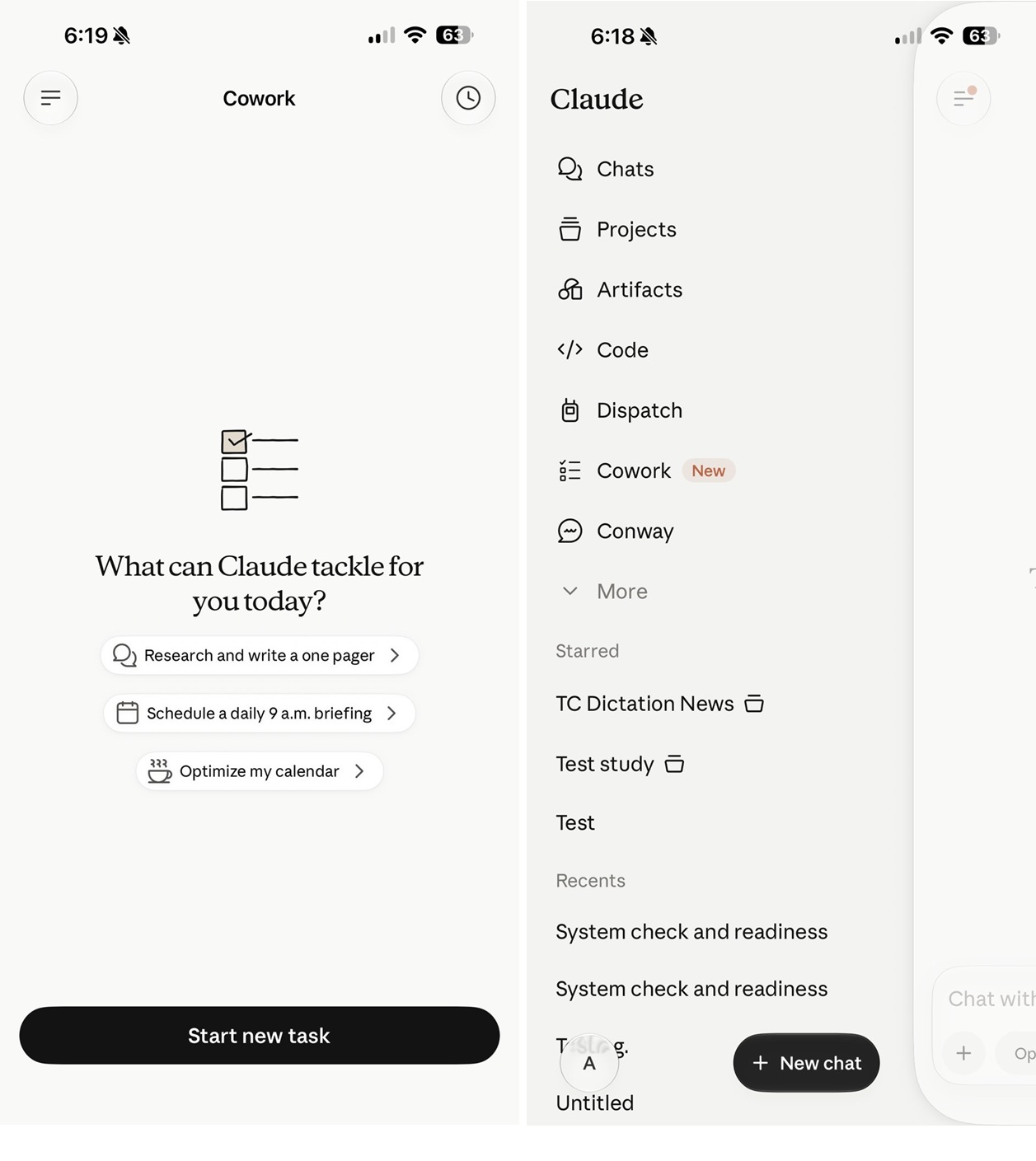
Claude Cowork
Claude Cowork on mobile

If you look at the above screenshot, it clearly confirms that you will be able to "start and steer tasks directly from your phone," and also "check in from your phone, browser, or Claude desktop app."

Most importantly, Anthropic notes that "work continues in the background, even when you close the app."

Claude Cowork won't turn your phone into an agentic platform

Based on the screenshots, it's quite obvious that Anthropic does not plan to turn Claude's mobile app into a full desktop app.

Instead, it appears that Claude Cowork on mobile would be similar to a remote control for Cowork on your PC.

This aligns with Anthropic's current explanation of Cowork. The company says Cowork runs directly on your computer, giving Claude access to the files you choose to share. 

In other words, your phone may become the remote control for Cowork, but your computer is still where the actual heavy lifting happens.

Anthropic has not publicly announced full mobile Cowork support yet, but the screenshots suggest the feature is already being prepared inside Claude for mobile.

Test every layer before attackers do

Security teams log 54% of successful attacks and alert on just 14%. The rest move through your environment unseen.

The Picus whitepaper shows how breach and attack simulation tests your SIEM and EDR rules so threats stop slipping by detection.

Get the whitepaper

热门新闻: